Background
In my previous post, I tried to fix TLE downloads in the most recent available version of gpredict on Debian 12. This works to some degree, but I noticed there can still be problems with satellites that have become non-operational (i.e. removed from the CelesTrak .cat files) since the satellite data was imported into the gpredict tree.
One satellite in particular that was bothering me was METEOR M-1 (NORAD ID 35865). I could see that it was making passes overhead using my https://github.com/bxlentpartyon/satellite_passes script, but the timing/position of the passes seemed off.
It took me a while to figure this out, but the problem is that, when gpredict updates its TLE data, it downloads all of the latest “category” files, and then creates or updates individual .sat files for each satellite that it finds TLE data for in those files.
That sounds simple enough, but what you don’t hear in there is anything about what happens if a satellite gets removed from the latest version of one of these “category” files. Well, in that case, we just leave whatever stale TLE data we currently had sitting around.
I found that even when using the --clean-tle switch, these “stale” satellites don’t get removed. I added the following to ~/.config/Gpredict/gpredict.cfg to investigate futher:
[LOG]
LEVEL=4
And it turns out at the we remove all the TLE data with this switch, but then puts it right back, from whatever shipped with the package:
2025/03/16 22:52:13|3|clean_tle: Cleaning TLE data in /home/athorlton/.config/Gpredict/satdata
2025/03/16 22:52:13|3|clean_tle: Removed 13403.sat
2025/03/16 22:52:13|3|clean_tle: Removed 42785.sat
2025/03/16 22:52:13|3|clean_tle: Removed 28932.sat
.....
2025/03/16 22:52:13|3|Copying satellite data to user config
2025/03/16 22:52:13|3|create_sat_files: Found 979 satellites in /usr/share/gpredict/data/satdata/satellites.dat
2025/03/16 22:52:13|3|create_sat_files: Written 979 new satellite to user config
So that’s not useful for cleaning up stale data either…
My next idea here was to try to completely blow away the ~/.config/Gpredict/satdata, but it also “properly” handles this by restoring the stock stuff as well:
2025/03/16 23:02:50|3|Copying satellite data to user config
2025/03/16 23:02:50|3|create_sat_files: Found 979 satellites in /usr/share/gpredict/data/satdata/satellites.dat
2025/03/16 23:02:50|3|create_sat_files: Written 979 new satellite to user config
2025/03/16 23:02:50|3|Copying satellite categories to user config
2025/03/16 23:02:50|4|create_cat_files: Successfully copied iridium.cat
2025/03/16 23:02:50|4|create_cat_files: Successfully copied science.cat
2025/03/16 23:02:50|4|create_cat_files: Successfully copied cubesat.cat
.....
Super convenient.
Solution
One sort of obvious thing that does actually work here is to just remove the .sat file from ~/.config/Gpredict/satdata for anything that you observe to be stale, but this obviously isn’t ideal, as it’s not really obvious at a glance that something is wrong. I only caught these issues by comparing stuff directly with N2YO in real time.
Looking at the source for the function that keeps putting everything back gave me another idea:
src/first-time.c:
635     /* check if there already is a .sat and .cat in ~/.config/... */
636     datadir_str = get_satdata_dir();
637     datadir = g_dir_open(datadir_str, 0, NULL);
638     while ((filename = g_dir_read_name(datadir)))
639     {
640         /* note: filename is not newly allocated */
641         if (g_str_has_suffix(filename, ".sat"))
642             have_sat = TRUE;
643         if (g_str_has_suffix(filename, ".cat"))
644             have_cat = TRUE;
645     }
646     g_free(datadir_str);
647     g_dir_close(datadir);
648
649     if (!have_sat)
650         create_sat_files(error);
651
652     if (!have_cat)
653         create_cat_files(error);
The check here is literally just to see if there’s something called <blah>.sat and something called <blah>.cat in the satdata directory, so blowing everything away, and creating two dummy files in there, like this:
cd ~/.config/Gpredict/satdata
rm -rf *
touch hack.sat
touch hack.cat
Will actually achieve something close to what I was after here. If you do this, then start gpredict, you should see that there are no satellites to track now.
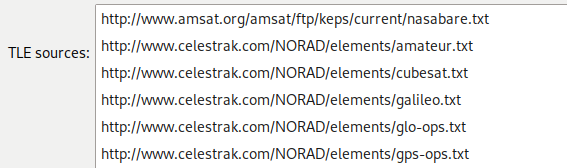
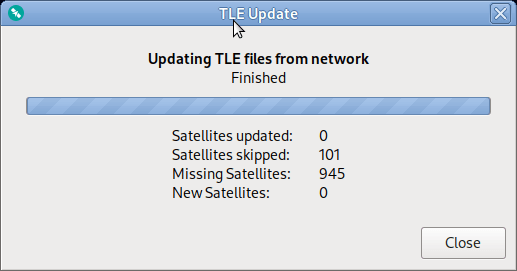
At this point, running a regular TLE update, i.e. Edit -> Update TLE data from network will pull in all the valid TLE data from your provided URLs (I discussed correcting these for Debian in Part 1 of this blog). After that, if you restart gpredict, you’ll be running with only fresh, valid TLE data from CelesTrak.
This might leave you asking “well what if I want actual updated TLE data for stuff that has fallen out of the .cat files?” Which is a completely fair question, and was originally my goal here…
Unfortunately, that’s a bit more complicated problem to solve, since gpredict really seems to expect to be fed links from https://celestrak.org/NORAD/elements/, and there doesn’t appear to be a good “give me everything” link on there. I’m still poking around looking for a hack to address this, but the real answer is probably to just update gpredict itself to be more clever.

 Slapping Iron